
Use History to access the tool usage history, a vehicle history based on VIN, and user histories. The search function can also be used find test records for specific vehicles and technicians.
At the Main Menu, tap History. By default the Tool History screen is displayed.
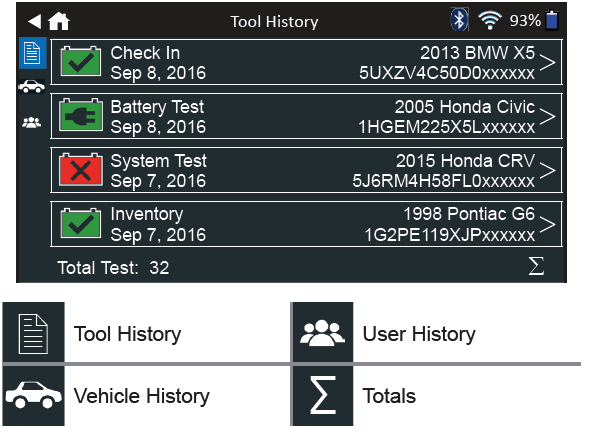 Tool History
Use Tool History to view test total history as well as in vehicle and out of vehicle test totals. Individual test results are also displayed.
Tap > to view individual test details.
Tap Σ to view Total By Test Decision, Total By Test Type, and Total By Date And Location.
Tap Done to return to the Tool History screen.
Totals By Test Decision
The totals are displayed by possible results for all battery chemistries and potential test results.
|
Good Battery |
BC Open Or Load Fail Replace |
|
Good Recharge |
Broken Weld Replace |
|
Charge & Retest |
Temp Sensor Failed |
|
Replace Battery |
Aborted |
|
Badcell Short Replace |
Invalid Test |
|
Remote Post |
Aborted / 24V |
|
Side Post |
Out Of Balance |
Totals By Test Type
Displays test totals by test type.
|
System Test |
Customer Delivery |
|
Battery Test |
Inventory |
|
Check In |
Totals By Date And Location
Displays test totals by time interval. Also displays the number of tests performed in and out of vehicle.
|
Last 7 Days |
In Vehicle |
|
Last 30 Days |
Out Vehicle |
|
Last 90 Days |
Vehicle History
Vehicle History displays test totals conducted on specific vehicles based on the VIN. It is also possible to enter a VIN to search for test records for a specific vehicle by tapping the displayed buttons.
Tap on the records displayed on the right side of the screen to view the individual test results.
Vehicle Select Option
Tap the magnifying glass icon to select vehicle search option.
Manual Lookup: Use the on-screen keypad to manually type the 17-digit VIN and tap Next.
VIN Scan: Use the camera built into the back of the Controller handle to scan the VIN bar code. For best results, use the barcode located on the driver’s side door frame. The VIN is also displayed behind the window on the driver’s side dashboard.
User History
Tap > to view individual test details.
Tap Σ to view Total By Test Decision, Total By Test Type, and Total By Date And Location.